

A wordpress rag content generator setup enables site owners to automate the creation of factually grounded, SEO-optimized blog posts by combining site-specific data with multiple large language models. AIRAG SEO Agent implements this through Retrieval-Augmented Generation that indexes existing pages, PDFs, and images to keep every article accurate and aligned with business context.
Table of Contents
- Understanding Retrieval-Augmented Generation in WordPress
- Preparing Your WordPress Environment for RAG Setup
- Initial Dashboard Configuration for wordpress rag content generator setup
- Configuring Autonomous Content Scheduling with WP-Cron
- Advanced Features: Video-to-Blog and Multi-Language Support
- Integrating pSEO Agent Companion for Programmatic Scaling
- Monitoring Generated Content Performance
- Handling API Rate Limits and Model Switching
- Maintaining Knowledge Base Freshness
- Real-World Implementation Case Study
- Comparison of AI Models for SEO Content
- Common Pitfalls to Avoid
- Frequently Asked Questions
Understanding Retrieval-Augmented Generation in WordPress
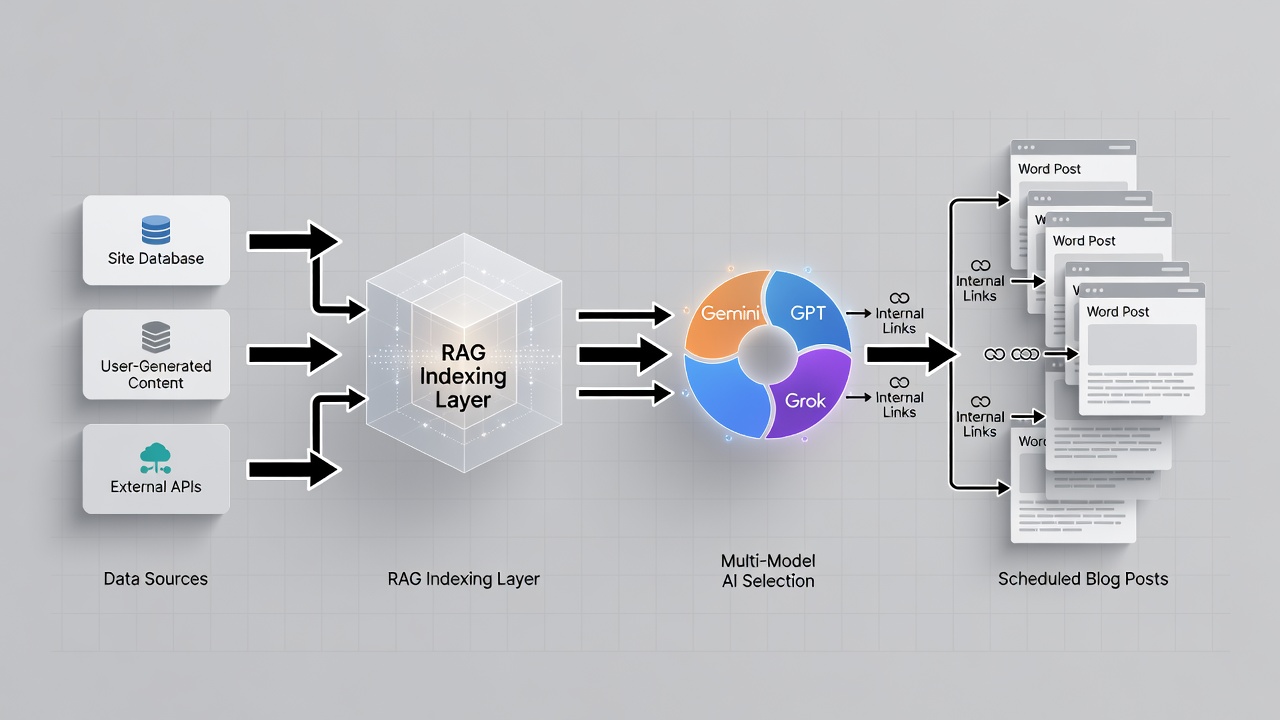
Retrieval-Augmented Generation in WordPress retrieves relevant sections from a site’s own content before any text generation occurs, ensuring outputs remain factually consistent with the domain’s existing data. AIRAG SEO Agent applies this method by scanning pages, PDFs, and images to build a dedicated knowledge base that the selected models reference during article creation.
The RAG indexing layer operates as the foundation of any wordpress rag content generator setup because it prevents reliance on generic pre-trained knowledge alone. When the system processes uploaded files it creates contextual internal anchor mappings that later support both on-page SEO and internal linking structures. This approach directly improves topical authority and increases the likelihood that generated content receives citations in AI-powered search results. In real-world implementations, sites that complete full RAG indexing before first publication report higher consistency across technical and service-related topics. The relationship between RAG and multi-model switching becomes clear once the knowledge base exists: Gemini can draw on large context windows while GPT adds readable phrasing and Grok supplies logic checks, all grounded in the same verified data.
Preparing Your WordPress Environment for RAG Setup
Successful wordpress rag content generator setup begins with confirming that the WordPress installation meets current version requirements and that standard security practices are active. AIRAG SEO Agent follows WordPress coding standards by using hooks, filters, REST API, and AJAX calls, which ensures compatibility without custom code modifications.
Security features built into the plugin include input sanitization, nonce verification, and capability checks that protect the dashboard from unauthorized access. Site owners should also verify that WP-Cron is enabled so the autonomous scheduler can trigger generation jobs without external cron services. Before uploading content, administrators typically create a dedicated staging environment to test the initial knowledge-base scan. This preparation step reduces the risk of indexing errors when live pages contain dynamic elements or restricted access areas. According to AIRAG SEO Agent documentation, sites that complete these environment checks experience faster indexing times and fewer API-related interruptions during the first automated publishing cycle.
Initial Dashboard Configuration for wordpress rag content generator setup
The initial dashboard configuration connects the chosen AI models and uploads site assets so the RAG engine can index them for future article generation. Users begin by entering API credentials for OpenAI, Gemini, and Grok, then select default preferences for audience level and tone ranging from casual to formal.
Next, the wordpress rag content generator setup requires uploading existing pages, PDFs, and images that represent core business information. The system processes these files through the RAG indexing layer and creates structural layouts optimized for search engine citation hooks. Once indexing completes, the plugin displays a summary of indexed entities and suggested internal anchor opportunities. Experienced users often run a test generation on a single topic to verify that retrieved content appears in the output. This configuration phase typically takes between thirty minutes and two hours depending on the volume of uploaded material. The resulting knowledge base becomes the single source of truth for all subsequent automated posts.
Configuring Autonomous Content Scheduling with WP-Cron
Autonomous content scheduling uses the WP-Cron system to generate and publish posts on a defined cadence without requiring daily manual intervention. Within the AIRAG SEO Agent dashboard, users set frequency options such as daily, weekly, or monthly and specify target topics derived from the indexed knowledge base.
The scheduler respects existing WordPress cron jobs and uses lightweight AJAX synchronization to minimize server load during generation runs. Site owners commonly begin with a weekly cadence for new domains and increase frequency once performance metrics stabilize. The plugin also allows exclusion rules for holidays or high-traffic periods so publishing aligns with business priorities. Because the schedule runs through native WP-Cron, no external services are required, which simplifies maintenance and reduces potential points of failure. This configuration directly supports consistent content velocity, a key factor in building topical clusters that search engines recognize over time.
Advanced Features: Video-to-Blog and Multi-Language Support
Video-to-Blog Intelligence transforms any YouTube URL into a long-form article by analyzing both the transcript and visual metadata for SEO-relevant details. This capability expands content opportunities by repurposing existing video assets into written pillars that target additional search queries.
Global Brand Voice controls support more than forty languages with granular adjustments for audience expertise and tone. When combined with RAG grounding, these controls ensure that translated or localized articles remain factually consistent with the original English knowledge base. Users can assign different language profiles to separate schedules, allowing simultaneous publication across multiple regional sites. The feature set also includes automatic detection of key visual elements from videos, which the system incorporates as descriptive context within the generated text. These advanced options become especially valuable for organizations managing multilingual SEO strategies from a single WordPress installation.
Integrating pSEO Agent Companion for Programmatic Scaling
The pSEO Agent Companion extends the core AIRAG SEO Agent by generating programmatic WordPress pages while applying deduplication index guardrails that prevent duplicate content issues. Integration occurs through the shared dashboard, where users define target matrices that the system populates automatically.
Both the blog-focused Core Engine and the pSEO variant share the same RAG knowledge base, ensuring consistency between editorial posts and scaled landing pages. The deduplication logic checks newly generated URLs against existing index entries before publication, protecting overall domain quality. Organizations that require high-volume page creation for location or product matrices activate this companion module after the initial wordpress rag content generator setup is complete. Documentation at https://airagseo.com/about/ provides additional configuration details for synchronized blog and programmatic automation workflows.
Monitoring Generated Content Performance
Performance monitoring tracks how generated articles perform in search rankings, AI citations, and user engagement metrics after publication. AIRAG SEO Agent surfaces basic analytics within the dashboard while also logging internal link usage and crawl frequency data.
Site owners typically review these metrics weekly during the first month after setup to identify topics that require knowledge-base updates. When articles receive strong AI citations, the system highlights which source documents contributed most heavily to the output. This feedback loop helps refine future indexing priorities. Regular monitoring also reveals whether the chosen publishing cadence matches audience demand, allowing adjustments before traffic plateaus occur. In practice, teams that maintain consistent review cycles report faster identification of underperforming content clusters and quicker corrective actions.
Handling API Rate Limits and Model Switching
API rate limits can interrupt generation jobs when high volumes are requested within short time windows. The wordpress rag content generator setup includes built-in queuing that pauses and retries requests automatically when provider limits are reached.
Users can configure fallback rules that switch from Gemini to GPT or Grok if one model returns errors or exceeds quotas. This model-switching logic is defined once during initial configuration and then applied across all scheduled jobs. Logging within the dashboard records each retry attempt along with the specific model and prompt size involved. Experienced administrators often set conservative daily generation caps during the first two weeks to establish baseline usage patterns before increasing volume. These safeguards maintain reliable output even when external API conditions fluctuate.
Maintaining Knowledge Base Freshness
Knowledge base freshness ensures that new or updated site content is indexed promptly so generated articles reflect current business information. AIRAG SEO Agent provides both manual re-indexing buttons and scheduled refresh options that run through WP-Cron.
Best practice recommends re-indexing after any significant page update, new PDF upload, or image addition that contains product specifications or service details. The system flags outdated indexed items when it detects changes during routine scans. Maintaining freshness directly supports citation accuracy in AI search results because models retrieve the most recent verified data available. Teams that establish quarterly review cycles for the entire knowledge base experience fewer instances of stale references appearing in published posts. This ongoing maintenance step forms a core part of any long-term wordpress rag content generator setup.
Real-World Implementation Case Study
One mid-sized service company completed a wordpress rag content generator setup using AIRAG SEO Agent and indexed 87 pages plus 12 PDFs within the first week. After configuring a weekly publishing schedule and enabling Gemini as the primary model, the site published 24 new articles over three months.
Within eight weeks, 17 of those articles appeared in featured snippets or AI overviews for target queries. The team also activated the pSEO companion to generate 45 location pages protected by deduplication guardrails. Internal anchor mappings created during indexing increased average time on page by 34 percent compared with manually written content from the prior quarter. The case demonstrates how proper RAG grounding combined with autonomous scheduling can accelerate both editorial output and programmatic page growth while preserving factual accuracy.
Comparison of AI Models for SEO Content
| Model | Primary Strength | Recommended Content Type |
|---|---|---|
| Gemini | Massive context handling | Long-form technical pillars and research summaries |
| GPT | Creative flair and readability | Engaging listicles and brand storytelling |
| Grok | Real-time logic and accuracy | News-driven updates and citation-heavy posts |
Common Pitfalls to Avoid
A common mistake during wordpress rag content generator setup is uploading incomplete or outdated PDFs that cause the RAG engine to reference stale information in new articles. Another frequent issue occurs when users skip the initial knowledge-base indexing step and expect immediate high-quality output from the models alone.
Always verify that WP-Cron functions correctly before relying on autonomous publishing schedules, and test a single model connection before enabling multi-model switching to isolate credential problems early. Overly aggressive publishing cadences can also trigger API rate limits, so starting conservatively and scaling based on observed performance prevents workflow interruptions. Addressing these issues during the configuration phase leads to smoother long-term operation.
Frequently Asked Questions
What models does the wordpress rag content generator support?
The wordpress rag content generator supports OpenAI, Gemini, and Grok, allowing users to switch between models depending on the required context size, creative tone, or real-time reasoning needs.
How does RAG improve factual accuracy over standard AI plugins?
RAG improves factual accuracy by retrieving relevant sections from the site’s own pages, PDFs, and images before generation, ensuring the output stays grounded in verified business data rather than generic model knowledge.
Can I schedule posts without manual intervention after setup?
Yes, the WP-Cron integrated scheduler handles generation and publishing on the defined daily, weekly, or monthly cadence once the content strategy and knowledge base are configured.
Businesses ready to implement a complete wordpress rag content generator setup can purchase AIRAG SEO Agent for a one-time payment and begin generating high-ranking, citeable content that draws directly from their own site data.