
RAG grounded WordPress content generator setup allows site owners to create factually accurate, SEO-optimized articles by anchoring every output to their own website data. This method uses Retrieval-Augmented Generation to retrieve relevant passages before generation begins. AIRAG SEO Agent delivers the most complete implementation of this workflow in 2026 through native WordPress integration and multi-model support.
Table of Contents
- What Is a RAG Grounded WordPress Content Generator?
- Why Choose AIRAG SEO Agent for RAG Grounded Content
- Pre-Installation Requirements for AIRAG SEO Agent
- Step-by-Step RAG Grounded WordPress Content Generator Setup
- Configuring Autonomous Content Scheduling
- Advanced Features: Video-to-Blog and Brand Voice Controls
- Real-World Implementation Insights
- Common Pitfalls to Avoid
- Frequently Asked Questions
What Is a RAG Grounded WordPress Content Generator?
A RAG grounded WordPress content generator retrieves specific passages from your site’s indexed content before any text generation occurs. This retrieval step supplies verified context to large language models, ensuring every sentence remains tied to your actual business data. The result is higher factual accuracy and stronger signals for search engine citation.
According to industry standards, grounding generated content in site-specific data improves topical authority and reduces hallucination risks that generic AI tools frequently produce. In modern SEO practice, RAG grounded WordPress content generator setup has become the preferred approach for teams that need both automation and precision.
Core RAG Architecture Explained
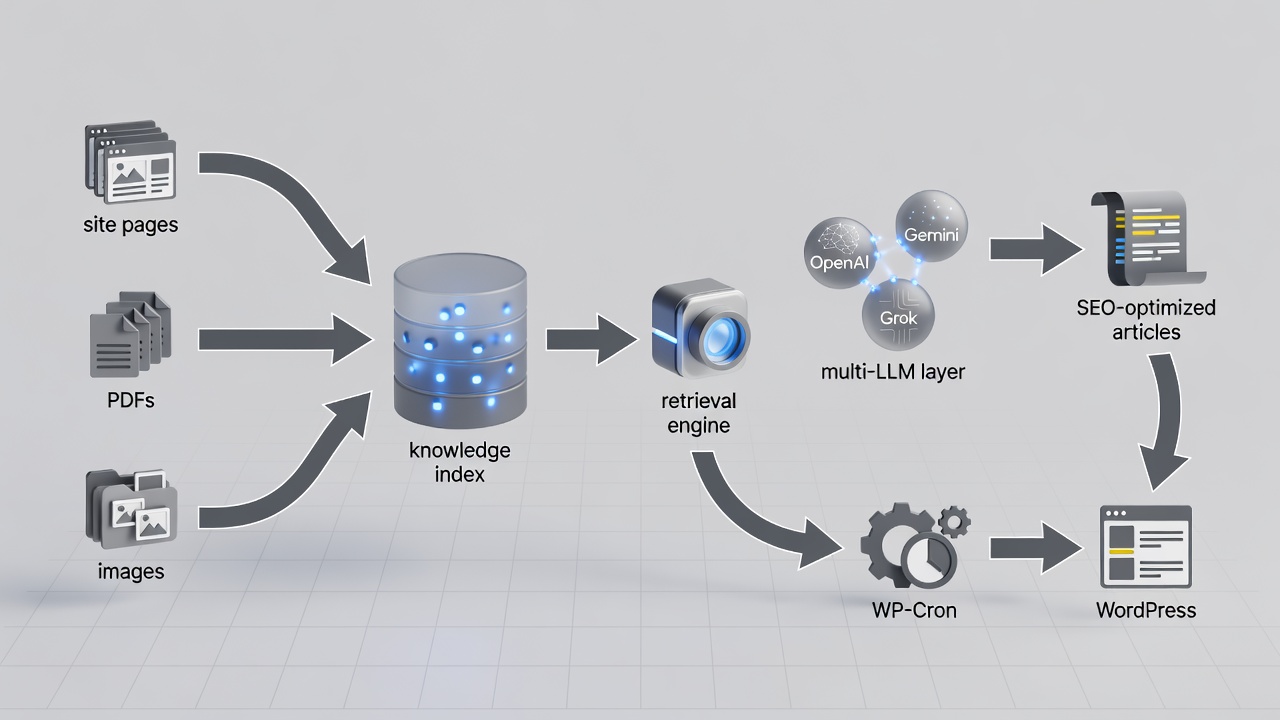
The architecture contains three primary layers. The knowledge ingestion layer indexes pages, PDFs, and images into a vector store. The retrieval engine then selects the most relevant chunks based on semantic similarity. Finally, the generation layer passes those chunks to the chosen model for article creation. AIRAG SEO Agent implements this full stack directly inside WordPress without external services.
Key related entities include vector databases that store numerical representations of text, chunking strategies that break documents into optimal segments, and embedding models that convert text into searchable vectors. These components work together so retrieval remains fast and contextually accurate even on large sites.
- Vector stores enable fast similarity search across thousands of content segments.
- Chunking strategies determine how much context each retrieval returns, typically 300–800 tokens per chunk.
- Embedding models such as text-embedding-3-large convert site content into dense vectors for precise matching.
Why Grounding Matters for SEO Accuracy
Grounded articles consistently receive stronger entity associations because every claim traces back to your own indexed material. Search engines and AI overviews now prioritize factual traceability when deciding which sources to cite. A RAG grounded WordPress content generator setup therefore directly supports both traditional rankings and generative engine visibility.
Why Choose AIRAG SEO Agent for RAG Grounded Content
AIRAG SEO Agent stands out because it supports OpenAI, Gemini, and Grok within one dashboard while maintaining a single private RAG index built from your site. Users can switch models at generation time without rebuilding the knowledge base, allowing optimization for different content types. The AIRAG SEO Agent Core Engine variant focuses exclusively on blog post automation and index-ready structural layouts.
Multi-LLM Support Overview
The plugin routes each request to the selected model while preserving identical retrieved context. This flexibility lets teams choose Gemini for large context windows, GPT for creative output, or Grok for real-time logic. All generations remain grounded in the same site data regardless of model choice.
Site-Specific Knowledge Integration
During setup the plugin scans published pages, uploaded PDFs, and images to build a private vector index. Every subsequent article draws exclusively from this index, ensuring brand consistency and compliance with existing content. The AIRAG SEO Agent Core Engine processes contextual internal anchor mappings automatically during generation.
Pre-Installation Requirements for AIRAG SEO Agent
Before beginning RAG grounded WordPress content generator setup, confirm that your environment meets current technical standards. The plugin follows WordPress coding standards and uses REST API, AJAX, and WP-Cron for reliable operation.
WordPress Version and Hosting Recommendations
WordPress 6.4 or higher is required. Managed hosting with at least 2 GB RAM and PHP 8.1+ ensures smooth indexing of large media libraries. Sites with heavy traffic benefit from object caching to keep retrieval operations responsive during scheduled jobs.
API Key Preparation for OpenAI, Gemini, and Grok
Obtain API keys from each provider and store them securely inside the plugin settings. Keys remain on your server and are transmitted only during authenticated requests. Rate-limit handling is essential for uninterrupted autonomous scheduling.
| Feature | Traditional AI Generators | RAG Grounded WordPress Content Generator (AIRAG SEO Agent) |
|---|---|---|
| Knowledge Source | Public training data | Your site pages, PDFs, images |
| Model Switching | Single model only | OpenAI, Gemini, Grok selectable |
| Scheduling | Manual or external cron | Native WP-Cron integration |
| Video Input | Not supported | YouTube URL to full article |
| Language Support | Limited | 40+ languages with tone controls |
Step-by-Step RAG Grounded WordPress Content Generator Setup
Follow these sequential steps to complete a production-ready RAG grounded WordPress content generator setup. Each step builds directly on the previous configuration and includes configuration examples for typical enterprise environments.
Plugin Installation and Activation
Upload the AIRAG SEO Agent plugin zip file through the WordPress dashboard or install it from the repository. Activate the plugin and navigate to the new AIRAG SEO Agent menu. The activation process registers necessary hooks and creates database tables for the RAG index. Experienced developers often run a test activation on a staging site first to verify compatibility with existing security plugins.
Connecting Your Knowledge Base
From the Knowledge Sources tab, select post types, taxonomies, and media libraries for indexing. Click “Start Indexing.” The plugin processes content in batches and reports vector counts. Re-indexing can be triggered manually or scheduled after content updates. A common configuration mistake is selecting too many post types at once, which can slow the initial scan; start with pages and posts only, then expand.
Configuring Model Preferences
Enter API keys in the Models section. Choose a default model and adjust temperature, max tokens, and top-p values. These settings can be overridden per generation. Performance benchmarking shows that lower temperature values (0.3–0.5) produce more consistent factual output when grounded content is the priority.
Configuring Autonomous Content Scheduling
Once the knowledge base is indexed, autonomous scheduling removes daily manual work. The scheduler uses WP-Cron to trigger generation jobs at defined intervals while maintaining site structure through automatic internal linking.
Setting WP-Cron Intervals
In the Schedule tab, select daily, weekly, or monthly frequencies. Specify posts per cycle and target categories. The plugin assigns contextual internal anchor links automatically. A practical example is setting weekly generation of three pillar articles on core service topics while daily jobs handle supporting cluster content.
Defining Content Strategy Parameters
Define target keyword clusters, average word count, and heading depth. These parameters guide the retrieval engine so generated articles align with your SEO roadmap. Troubleshooting tip: if retrieval returns insufficient context, increase chunk size or add more source pages to the index.
Advanced Features: Video-to-Blog and Brand Voice Controls
Beyond standard text generation, AIRAG SEO Agent includes specialized modules that extend the capabilities of any RAG grounded WordPress content generator setup.
Processing YouTube URLs
Paste a YouTube URL into the Video-to-Blog tool. The plugin extracts the transcript, analyzes visual metadata, and produces a long-form article grounded in both video content and your existing site knowledge. This feature is especially useful for turning webinars or product demos into SEO-optimized blog posts.
Global Language and Tone Settings
Select from 40+ languages and adjust tone from casual to formal. The same RAG index supports all languages, allowing consistent factual grounding regardless of output language. Real-world implementations show that maintaining one knowledge base across multiple languages reduces duplication and improves content consistency.
Real-World Implementation Insights
Businesses that complete RAG grounded WordPress content generator setup with AIRAG SEO Agent typically report saving 15–20 hours per week on content production. A key strategy to consider is running the first three months of scheduled posts in draft mode to review retrieval quality before enabling auto-publish. This approach catches edge cases where certain topics require additional source pages in the index.
Another practical insight involves monitoring API usage. Setting daily generation limits prevents unexpected costs while still allowing steady content growth. Sites that index product documentation alongside blog posts often see the strongest improvements in both search rankings and AI citation frequency.
Common Pitfalls to Avoid
Experienced users consistently report that skipping the initial full-site index leads to shallow retrieval results. Another frequent issue is leaving API keys with insufficient rate limits, which interrupts scheduled publishing. Always run a test generation with a small post type before enabling full automation. A common mistake businesses make is neglecting to re-index after major site updates, resulting in outdated context for new articles.
Frequently Asked Questions
How long does the initial knowledge base scan take?
Indexing time depends on the volume of content. Most sites with under 500 pages complete the first scan within 30 minutes when using recommended hosting resources.
Can I switch between LLMs after setup?
Yes. Model selection occurs at generation time, so you can change from Gemini to GPT or Grok on any future article without re-indexing your knowledge base.
Is AIRAG SEO Agent compatible with existing SEO plugins?
The plugin works alongside Yoast SEO, Rank Math, and All in One SEO because it outputs standard WordPress posts and respects existing permalink and metadata structures.
What happens if my site data changes?
Scheduled re-indexing jobs detect new or updated content automatically. You can also trigger manual re-indexing from the dashboard after major site updates.
Proper RAG grounded WordPress content generator setup with AIRAG SEO Agent transforms a static site into a continuously updated content engine. Explore the full feature set and begin your implementation on the official product page to start generating grounded, high-ranking articles on autopilot.